
Hardly any part repeats
A tool consists of many different components, each with its own machining sequence. The routine that series production builds up by itself has to be organised anew every time.
Tool & mould making
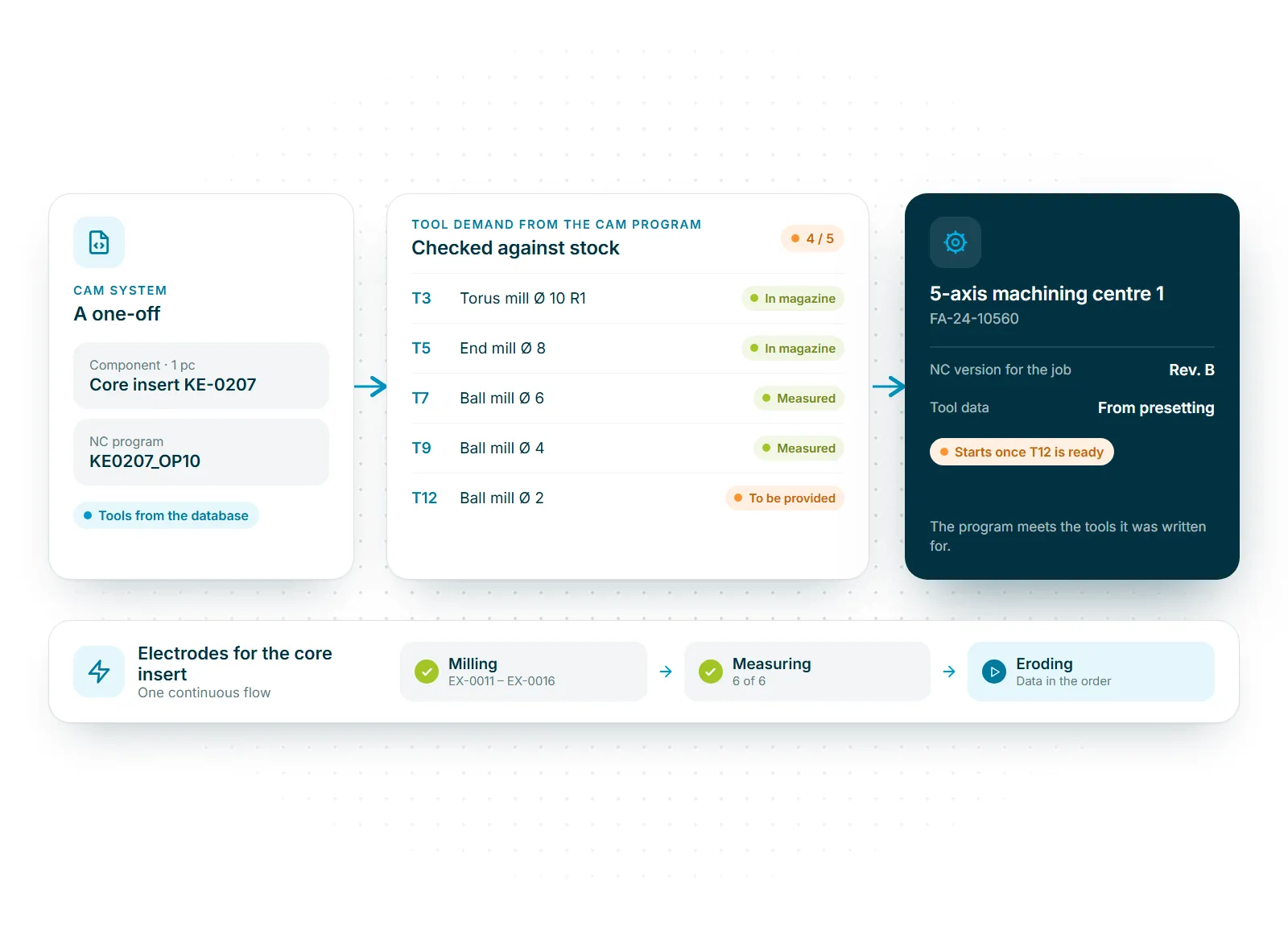
In tool and mould making, hardly any operation repeats itself. Programs, tools, clamping devices and machine have to fit together anew for every component. EVOMECS connects CAM, tool data, presetting and machine in one continuous process, so the program at the machine meets the tools it was written for.
From tool and mould making
A tool consists of many different components, each with its own machining sequence. The routine that series production builds up by itself has to be organised anew every time.
Parts are programmed with tools that are not ready at set-up or were measured differently. The operator searches, calls the programmer or rebuilds the set-up.
After changes to the component there are several versions of an NC program. If the wrong one runs, an expensive mould insert is quickly lost.
CAM, production planning, presetting and machine work with their own lists and files. Often only the person standing next to a component knows how far along it is.
The biggest lever in tool and mould making is the handover between programming and production. EVOMECS links the two through a central tool database that the CAM system uses as well. The program shows which tools are needed. Whatever is missing becomes visible before set-up begins.
After presetting, the tool data goes to the machine, and the right NC program is assigned to the production job. Available run times and usage data flow back from the machine. Programming therefore works with the tool status the shop floor actually has.
Which data is exchanged between CAM, presetting and machine depends on the existing systems, controls and interfaces.
Every component benefits from the status the previous one left behind.
Electrode process
In mould making, electrodes are among the most demanding pieces of equipment. With the optional add-on module AssetHub – Electrodes, EVOMECS takes them through the same digital flow as tools, from milling and measuring to eroding. The electrode and its measurement data stay assigned to the component it was made for.
The electrode is produced as an order of its own, with its NC program.
The measured values are recorded and assigned to the electrode.
At the EDM machine, electrode and measurement data are ready for the job.
Example workflow
Illustrative example, not a customer reference. The exact workflow depends on edition, machines and existing systems.
Many tool and mould makers start with digital orders and feedback at the workstation. The greatest benefit comes when the tool process and NC execution follow, because that is exactly where most interruptions arise in one-off production.

Benjamin Neubauer
Chief Executive Officer (CEO), EVOMECS
How to get started
In the first meeting we show you EVOMECS in a live demo tailored to your company. Afterwards you can try EVOMECS free of charge for two weeks in your own demo system.
First meeting: 30 minutes · online · free of charge