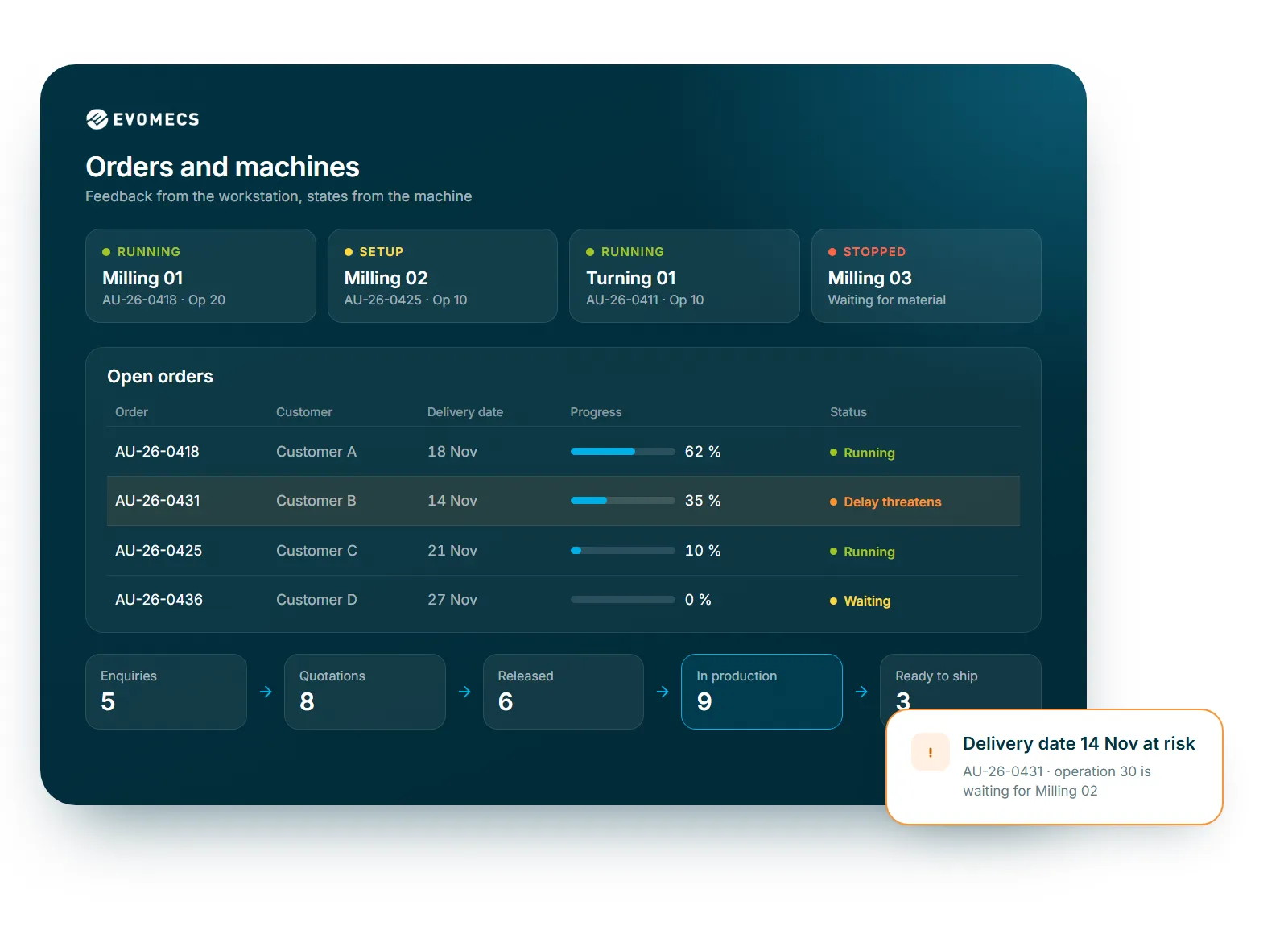
Many customers, tight deadlines. And every order in view.
In contract manufacturing, orders from different customers compete for the same machines, the same people and the same delivery dates. EVOMECS shows you what is running, what is waiting and which order is at risk of running late. Based on feedback from the workstation and states from the machine, not on asking around on the shop floor.
Order status and machine states at a glance
See deviations from the plan before the delivery date slips
From the enquiry to the finished part in one system
Orders from different customers run in parallel, rush jobs squeeze in between, quantities and dates change at short notice. Which sequence currently applies is on the planning board or only in the foreman's head.
The deadline slips, and nobody notices
Whether an order is on schedule often only becomes clear when the customer calls. By then an operation has slipped, taking the following orders on the same machine with it.
The machine is idle. But why?
Set-up, waiting for material, a program or a tool, a fault. Downtime has many causes. Without data, it remains unclear where the machine time actually goes.
Deciding on incomplete information
Run times are estimated, feedback is filled in at the end of the shift. Whether an order paid off and how the next quotation should be costed can hardly be answered reliably that way.
One status for office and shop floor. All day long.
The biggest lever in contract manufacturing is an up-to-date data basis. With EVOMECS, orders reach the workstation digitally, employees report progress and activities directly on the order, and connected machines supply states, run times and downtime automatically. The result is a picture of production that does not have to be pieced together at the end of the shift.
Because the plan and the feedback work on the same data, you can see where an operation takes longer than intended and which orders on the same machine are affected. Whether you reschedule, extend a shift or inform the customer is your decision. Dashboards show how run times, downtime and order throughput develop over the weeks.
Which machine data is available automatically depends on the control, interface and licences. Workstations without a connection are included through the feedback employees enter.
Example illustration
Early shift, customer orders
PlannedActual
5-axis MC
3-axis MC
Turning centre
Deburring
06:0008:0010:0012:0014:00
If an order runs longer or a machine stops, you see early which following orders will slip. Whether and how to reschedule is your decision.
Example workflow
A rush order comes in between.
Illustrative example, not a customer reference. The exact workflow depends on edition, machines and existing systems.
1Costing the enquiryAn existing customer asks at short notice for a small batch of housing covers. The quotation draws on similar components and their existing routings.
2Releasing the orderOnce the customer confirms, the quotation becomes the order. It only goes into production when the drawing and routing are complete.
3SchedulingThe production manager sees which machines are booked, slots the rush order in and recognises which other orders will slip as a result.
4Machining and reportingThe operation and its documents are ready at the workstation. Employees report progress, and the machine supplies run times and downtime.
5Post-calculationOnce the order is complete, the actual times are on record. Revenue, costs and margin can be compared, as a basis for the next similar quotation.
The features that make the difference in contract manufacturing.
Start with transparency. Grow towards the unmanned shift.
Most contract manufacturers start where the benefit shows fastest, with digital orders, feedback and machine states. You can start with individual machines and connect more step by step.
Tool and NC processes follow, making set-up and program start more reliable. If you later want to automate cells or run unmanned shifts, you use the same orders, tool data and NC programs for that. The Cell & line automation page describes what this looks like.
01Shopfloor LightDigital orders at the workstation, production and machine data, dashboards and in-process quality checks
02Shopfloor EssentialsTool demand, presetting, CAM-linked tool data and NC data management
03Shopfloor ProfessionalOrder-related NC transfer, process-reliable machine start and extended traceability
04AutomationAs an expansion option, cells and unmanned shifts, with the same jobs, programs and tool data
Frequently asked questions from contract manufacturing.
You do not need a large industry-specific ERP for this. EVOMECS covers the production-specific processes from the enquiry to the finished part, and a simple, industry-independent solution is enough for accounting. If you already use an ERP system, it remains part of your processes. It is connected via the optional OrderSync ERP interface, and we agree the scope with you on a project-specific basis. If you need ERP functions beyond that, you can build them as your own app, with the AI tool of your choice, and integrate them seamlessly into your production with EVOMECS Create.More about EVOMECS Create
EVOMECS shows which machines are booked and which orders will slip when a rush order is added or an operation takes longer. How orders are scheduled and rescheduled is your decision.
Yes. EVOMECS takes a manufacturer-independent approach. Orders and feedback also work on machines without a connection. Which states and run times are captured automatically depends on the control, interface and licences, and is checked machine by machine.
Because quotation, order and production are linked, revenue, costs and margin can be compared per order. The actual times come from the feedback at the workstation and, for connected machines, from the machine data. How meaningful this is depends on how completely feedback is reported.
At the workstation, the worker interface only shows what is needed for the operation at hand and guides through the steps with instructions and checklists. That helps especially when staffing changes. Many companies start with a few workstations and extend use once the processes have settled in.
Usually with Shopfloor Light on the machines where deadlines most often get tight today. That is where it shows fastest where time is lost. We are happy to discuss the right starting point using your orders in a demo.
Benjamin Neubauer
Chief Executive Officer (CEO), EVOMECS
How to get started
Your demo – tailored to your production.
In the first meeting we show you EVOMECS in a live demo tailored to your company. Afterwards you can try EVOMECS free of charge for two weeks in your own demo system.
1First meeting · 30 minutes onlineWe introduce EVOMECS, show it in a short live demo and clarify your needs.
2Your demo systemIf you wish, we set up your own demo system in Shopfloor Light – with your machines and sample data. You receive the invitation by email.
3Try it yourself for two weeksYou and your colleagues try out how orders, feedback, machine status and downtimes work together. Free of charge, without installation and without connecting machines.
4Connect your machinesIn Shopfloor Light you connect your machines yourself using our guide. If you wish, we support you in a pilot project.
With your consent, we use Google Analytics to understand how our website is used and to improve it. This sets cookies and transfers data to Google, including to the USA. Without your consent, no web analytics takes place. You can change your decision at any time via “Cookie settings” in the footer. Privacy policy